When to send event reminders (and how many is too many)
Starting timelines for social events and business events: when to send the invitation, the reminders, and the day-of text, plus how to adjust them for your crowd.
For most events, two or three reminders after the invitation is plenty: one around a week before, one a day or two before, and an optional logistics text on the day. Business events with registrations and agendas often add an earlier confirmation and a morning-of message. Treat the timelines below as starting points, not rules. Your crowd, the travel involved, and how much people need to prepare all move the dates.
The principle: every reminder needs a job
Before you add a reminder, name the one thing it does:
- Get an answer. RSVP by a date.
- Help people prepare. What to wear or bring, travel, tickets.
- Get them there. Time, address, parking, where to find you.
- Change something. A new time, room, or weather plan.
If a message doesn't have a job, skip it. Extra texts that only say "don't forget!" are the ones people start to tune out.
A starting timeline for social events
Birthdays, showers, reunions, graduation parties, holiday get-togethers.
| When | Message | Its job |
|---|---|---|
| 3–6 weeks before | Invitation with RSVP link | Get an answer by a date |
| About 1 week before | Reminder, plus RSVP nudge to anyone who hasn't answered | Prepare and close the list |
| 1–2 days before | Details: time, address, parking, what to bring | Help people prepare |
| Day of (optional) | Short logistics or “we're here” text | Get them there |
| Day after (optional) | Thank you, photos link | Close the loop |
Adjust it:
- Kids' parties. Parents plan weekends early, so send the invitation 3–4 weeks out and the details text 1–2 days before. Include drop-off and pick-up times.
- Travel involved. Weddings, reunions, and destination events need much more lead time: a save-the-date months ahead and the invitation well before travel plans get booked.
- Casual and small. A dinner with eight friends might need only the invitation and a same-day text.
A starting timeline for business events
Conferences, company events, client dinners, trainings.
| When | Message | Its job |
|---|---|---|
| At registration | Confirmation with date, venue, and what happens next | Confirm the plan |
| About 1 week before | Agenda, travel, and badge or check-in details | Help people prepare |
| 1 day before | Arrival logistics: doors, registration desk, parking or transit | Get them there |
| Morning of | Short “doors open at…” plus where to go | Get them there |
| During (as needed) | Room changes, schedule shifts, session starts | Change something |
| After | Thank you, slides or survey link | Close the loop |
Adjust it:
- Multi-day events. Send a short morning text each day instead of a long one at the start.
- Internal company events. Calendar invites do some of the work, so you might only need the day-before and morning-of texts.
- Customer-facing events. Keep it tighter, and make every text clearly useful. These are people you want to hear from you again.
For a fuller plan with owners and message drafts, the event communication plan tool builds a timeline for your event.
How many reminders is too many?
There's no magic number, but you've probably sent too many if:
- Two messages in a row could have been one.
- A text repeats the invitation without adding anything new.
- You're texting everyone when only the non-responders need it.
Target the people who need each message. An RSVP nudge only needs to reach guests who haven't answered. A parking update might only matter to the people driving.
Good timing habits
- Send at friendly hours. Late morning or early evening in your guests' time zone, not late at night.
- Schedule ahead. Write the whole sequence when you send the invitation, then edit if plans change.
- Make every reminder actionable. Include the link, the address, or the one thing they need to do.
- Let people opt out. Anyone who replies STOP should stop getting texts, and Text My Event handles that automatically.
Setting it up in Text My Event
With Text My Event's event text reminders, you write each reminder once and choose Schedule with a date and time in the event's time zone. Scheduled messages wait in your list, where you can edit or cancel them before they send. Each guest gets their own text, {First name} and {Event date} fill in per guest, and replies come back to your inbox.
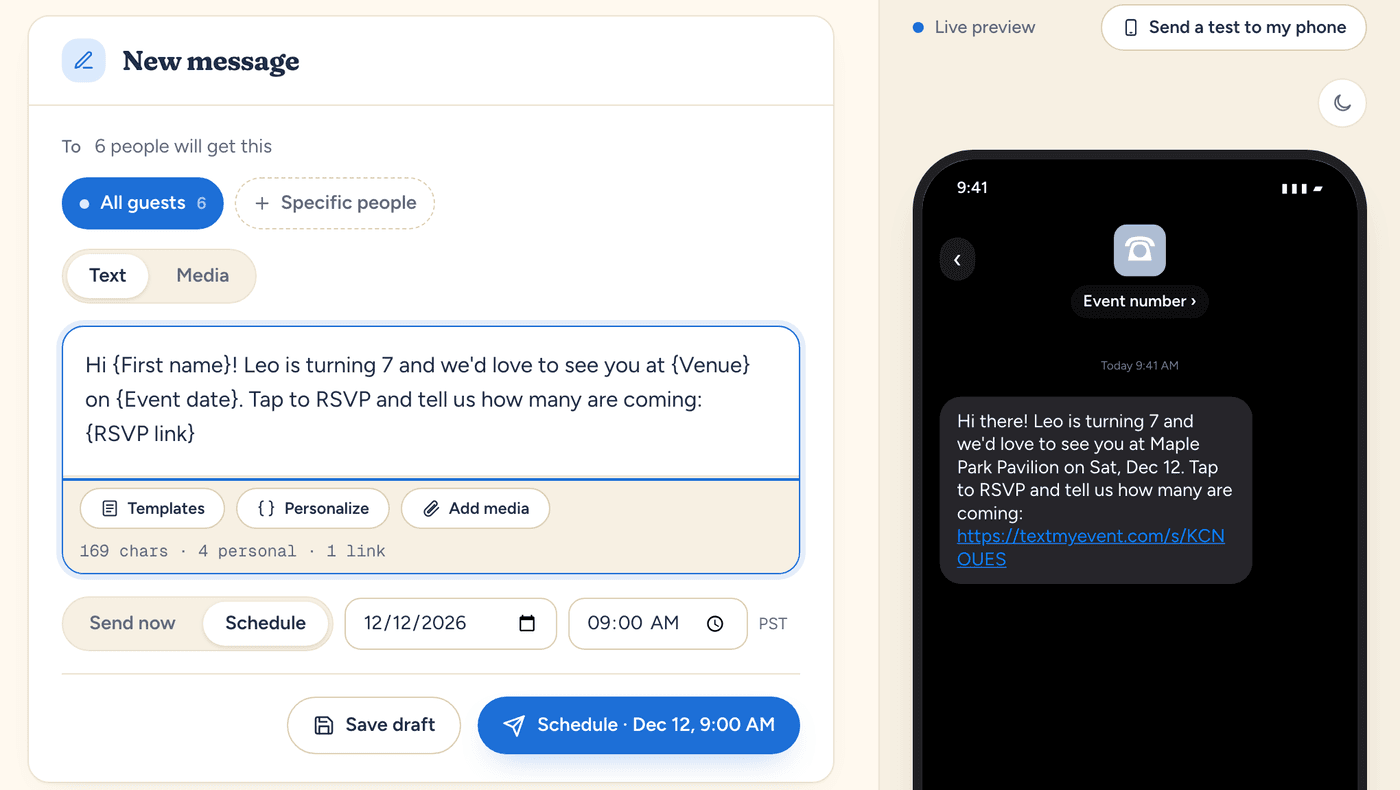
To target a reminder, send it to a group (like "Out of town" or "Speakers") or to specific people instead of everyone. To chase missing RSVPs, see how to ask for an RSVP after the deadline.
Run this for your next event.
Schedule your texts in minutes. Try it with 10 free texts to your own phone. No app for guests, no credit card.
Start freeWritten by the people who build Text My Event, and checked step by step against the product as it works today.