How to send a mass text individually (so nobody's in a group chat)
Send the same message to everyone as separate one-to-one texts. Guests can't see each other's numbers, and their replies come only to you. Here's how it works, with a real event example.
To send a mass text individually, use a tool that delivers one message as separate one-to-one texts instead of starting a group thread. Each person gets the message in their own conversation with you. Nobody sees who else got it, and a reply goes only to the sender. This is the difference between a group text and a mass text sent individually, and for events it's usually the one you want.
Group text vs. individual texts
When you add several people to one message in your phone's messaging app, you usually create a group conversation. Everyone sees everyone's number, and every reply buzzes every phone. That's fine for six close friends and miserable for forty guests.
Sending individually flips that:
- Privacy. Guests don't get each other's numbers.
- Quiet. One guest's "can I bring my kid?" doesn't notify the other thirty-nine.
- Answers you can use. Questions arrive as separate conversations you can answer one at a time.
- Personal touches. Each text can open with the guest's own name.
Your options
Your phone, one at a time. Copy the message and paste it into a separate conversation for each person. It's free and works for a few people. It gets slow and error-prone past a dozen, and replies are scattered across your messages.
Your phone's broadcast or "hide recipients" features. Some phones and messaging apps have them, but behavior differs between devices, carriers, and iPhone vs. Android. Test with two friends before you trust it with a guest list.
An event texting service. You write once, it sends one text per guest, and replies collect in one inbox. Text My Event works this way. Here's what that looks like in practice.
An example: a 7th birthday party
Maya is hosting her son Leo's birthday at a park pavilion and has 24 families to invite. Here's how she does it.
- She adds the families' mobile numbers on the Guests page, typed in or pasted from a spreadsheet, and confirms that each one agreed to get texts about the party.
- She writes one invitation and uses the
{First name}token so each text is addressed to the person who gets it.
- She sends it. Text My Event sends 24 separate texts from its sending number. Each parent gets one text in their own conversation, and it uses one text from her allowance per parent, however long the message is.
- Replies come back privately. One parent asks whether a younger sibling can come. Another asks which park entrance is closest. Both questions land in Maya's Replies inbox as separate conversations, and she answers each one directly. Nobody else sees either exchange.
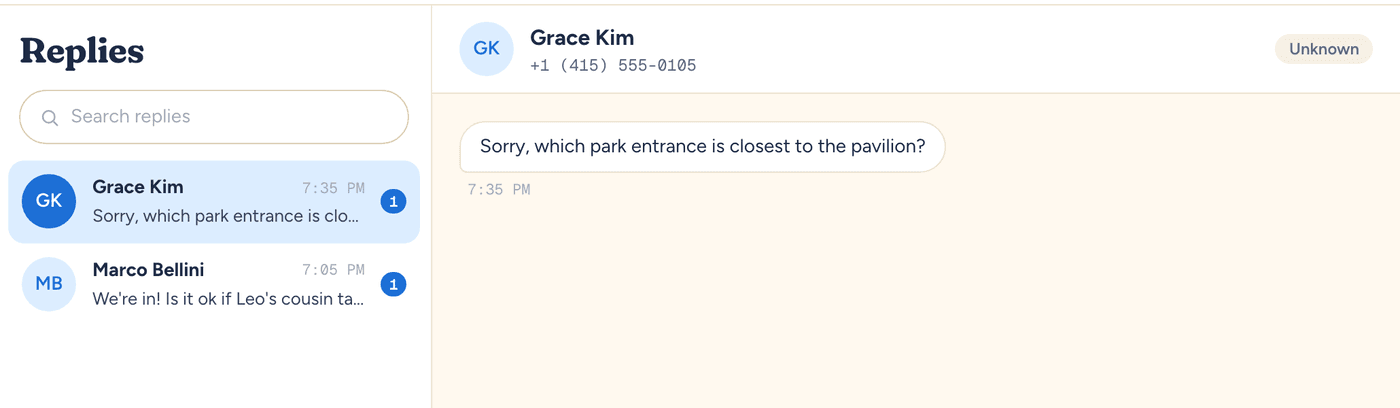
- Her partner helps. Maya adds him as a co-host, so he sees the same guest list, scheduled texts, and replies inbox and can answer questions while she's at work.
Get the details right
- Ask before you text. Only text people who agreed to hear from you about the event. Text My Event asks you to confirm that before your first send to a guest, and every guest can reply STOP to opt out.
- Keep it to one clear ask. Individual delivery makes replies manageable, but a text that asks three things gets three-part answers. If you need structured answers like party size or allergies, use an RSVP form link. Those answers go into your headcount, while free-text replies stay in the inbox.
- Send a test to yourself first. It's the fastest way to catch a token that didn't fill in or a link that's wrong.
- Check your region. Text My Event sends to US and Canadian (+1) mobile numbers only.
When a group chat is still the right call
If the whole point is for people to talk to each other, like a planning committee or a small trip, a group chat is fine. For anything where one person shares information and many people respond, send individually.
For a broader look at invitations, reminders, and day-of updates, see event text messaging. If you're starting from scratch, our step-by-step guide to sending invitations by text walks through the setup screen by screen.
Run this for your next event.
Schedule your texts in minutes. Try it with 10 free texts to your own phone. No app for guests, no credit card.
Start freeWritten by the people who build Text My Event, and checked step by step against the product as it works today.