Text RSVP vs. online RSVP form: which should you use?
Replying by text is the easiest thing to ask of a guest. A form gives you clean answers. Here's how they compare on guest effort, the information you get, and the work it creates for you, and how to combine them.
If you only need a yes or no from a small group, asking people to reply by text is the least effort for them. If you need a headcount, meal choices, or anything you'll add up later, an online RSVP form gives you structured answers you don't have to retype. For most events, the best setup is both: send the invitation by text and put a link to a short form in it.
What each one is
Text RSVP. The invitation arrives as a text and the guest replies in the same thread: "Yes! 2 of us." Nothing to open and nothing to fill in.
Online RSVP form. The guest opens a web page, often from a link in an email or text, and answers specific questions: attending or not, party size, meal, notes.
How they compare
| Reply by text | Online form | |
|---|---|---|
| Effort for the guest | Lowest: type a reply in a thread they already have open | A tap to open, then a few fields |
| What you get back | Free text: “yes”, “maybe”, “me + kids?” | Consistent answers to the same questions |
| Headcount | You read each reply and count by hand | Totals add up from the answers |
| Extra questions (meals, allergies) | Easy to ask, messy to collect | Built for it |
| Follow-up conversation | Natural, already in a thread | Needs a separate channel |
| Mistakes | Misread replies, missed messages | Typos in names; guests who skip optional fields |
| Best for | Small, casual events; quick yes/no | Larger events, catering, anything with numbers |
Guest effort
Text wins here. Replying takes seconds, works on any phone, and doesn't depend on a page loading. A form adds a step, so keep it short: two or three questions and no account to create.
Structured information
The form wins. "Yes, we'll be there!" doesn't tell you whether "we" is two people or five. A form question like "How many in your party?" does, every time. The same goes for meal choices, dietary needs, or which day of a multi-day event someone is coming.
Your workflow as the organizer
With text replies, you're the database. You read every reply, interpret it, keep a tally, and chase the vague ones. That's manageable for 12 guests and tedious for 120. A form gives you a list you can filter, but you lose the easy back-and-forth that a text thread gives you.
The combined approach: a text with a form link
Most of the time you don't have to choose. Send the invitation as a text, include a link to a short RSVP form, and keep the thread open for questions.
That's how Text My Event's text RSVP works:
- Each guest gets the invitation as their own text with your
{RSVP link}. No app and no account. - The form asks what you choose. "Can you make it?" and "How many in your party?" are there by default, and you can add short-answer or multiple-choice questions. Guests enter their name and mobile number and agree to receive event texts.
- Form answers go straight into your headcount. You see Going, Headcount, No reply, and Can't make it at a glance.
- Guests can still just text back. Those replies land in your private inbox, where you and your co-hosts can answer.
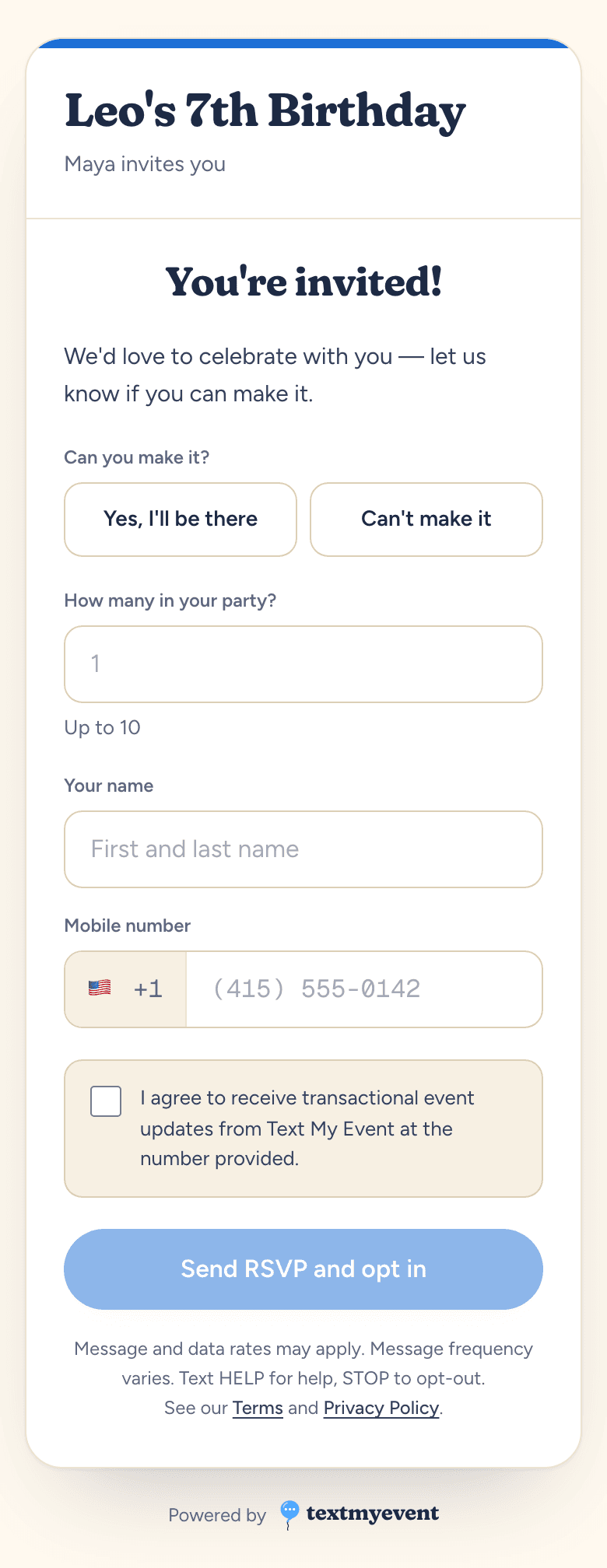
To be clear about the trade-off, a text reply doesn't update the headcount. If someone texts "yes, 3 of us" instead of tapping the link, you either set their status yourself in the RSVP guest list or reply with the link. That's the price of letting people answer however they like, and it's usually a small one.
Which should you use?
- A dinner for 8 or a casual hangout: a text asking people to reply is enough.
- A birthday party, shower, or reunion: text with a form link, so you get party sizes without the guesswork.
- A wedding, catered event, or anything with meal choices: a form, ideally linked from a text so it actually gets opened.
- A conference or company event: a registration form for the details, plus texts for reminders and day-of updates.
Whatever you choose, set a deadline and plan one follow-up. Our guide to asking for an RSVP after the deadline has wording for the guests who don't answer either way.
Run this for your next event.
Schedule your texts in minutes. Try it with 10 free texts to your own phone. No app for guests, no credit card.
Start freeWritten by the people who build Text My Event, and checked step by step against the product as it works today.